Skip to Content »

 Archived Geocaches in Central IL

  • November 10th, 2011
  • 10:16 pm

One thing Geocaching.com doesn’t make easy is finding the location of archived caches. I grabbed my whole history of pocket query files (back to April 2004) and built a GPX file containing all archive caches I could get my hands on. The map below shows up to 50 miles from Peoria, but my data is most complete within 30 miles of Peoria.

Click here for a larger map. You can also view this query in GPS Visualizer. If you want to download the GPX file to fool with yourself, go ahead.

Take a look if you’re interested. There have been quite a few times when I’ve wanted to know “what was that cache that used to be here?”, and this map has helped provide answers.

 Kayak storage racks

  • August 26th, 2011
  • 8:48 pm

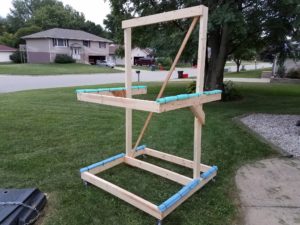
We recently bought a couple of recreational kayaks, and needed a way to store them. In order to safely and economically store them, I built some racks.

Kayak rack

Take a look at the project page for more details.

 Dollhouse bed finished

  • April 14th, 2011
  • 9:15 pm

I haven’t posted anything in quite a while, but at least I’ve got something done. Mia’s bed is finished!

dollhouse bed

For more information, see the project page.

 Geocache radius map tool

  • October 29th, 2010
  • 9:13 pm

Ok, this is something that very few of you will be interested in, but I wrote a web application to help in placing geocaches.

example geocache radius map

Geocaches can’t be placed to close to one another, so this tool can help you find which spots are off-limits. Take a look if you’re interested.

 Cutting table complete

  • October 27th, 2010
  • 9:30 pm

A fairly quick project I just finished was a “cutting table” for Dusty. I got to actually put some new woodworking techniques to use and had a good time working on it.

Dusty with the cutting table

It only cost about $50 to build, but it’s very sturdy and should hold up pretty well. View the project page for more details.

 Tasker for Android

  • September 15th, 2010
  • 7:49 pm

Earlier this year I got an Android phone (the Droid Incredible), a purchase I’m quite happy with. One thing I really like about the Android platform is it’s open nature. I know that’s become a trite sentiment, but compared to my iPod Touch, there are very few limits on my ability to tinker with the phone. Now that I’m fairly comfortable with the phone and the O/S, tinkering is exactly what has been on my mind!

An application I recently discovered is Tasker. It’s an amazing application that can be used for automating and customizing many of the features of an Android device. In short, you set up rules (called “contexts”) that, when triggered, cause different actions to occur.

Here are a few of the things I’m doing with Tasker:

  • At home, school, work, and church, set the ringer volume appropriately.
  • Turn on wi-fi only when I’m at home.
  • Announce the time every half-hour (when I’ve got the headphones plugged in).
  • When I receive a phone call or email, speak the name of the caller/sender.
  • When my geocaching app is running, don’t let the display time out and shut off.
  • When I plug in my headphones, launch the podcast app.
  • A couple of minutes after I connect to my home network, update and download my RSS feeds and podcasts.
  • If I’m someplace where the ringer needs to be off, ignore the volume buttons and keep quiet.
  • If I can’t find my phone, I can send a special text message to it to cause it to ring as loudly as possible.
  • If I think my phone is stolen, I can send a different text message to it. The phone will then find its location using GPS and reply with a message telling where it’s located, how fast it’s moving and how much battery life is remaining. I can also have it take a picture or record audio.

Initially, I was going to post my scripts here, but I realized there’s not realy any further contribution I can make, other than just casting my vote for this app. The Tasker Wiki has a good set of example profiles that you can use to create your own, and it covers most common topics fairly well.

Tasker is available in the Android Market using the QR code above. It’s only a few bucks, and in my opinion it’s money well spent. Tasker might be a little daunting at first, but once you get past the steep part of the learning curve, there’s a lot of functionality!

 Password-protected podcasts on Android

  • June 8th, 2010
  • 10:24 pm

One of the first things I wanted to do when I got my Android phone was get my podcasts available to me without having to sync with my computer (as was basically required on my iPod Touch). There are a number of choices for “podcatchers” on Android, but many of them don’t handle password-protected podcasts.

One of my favorite podcasts is the Bob and Tom podcast, which has a small subscription fee, and therefore requires authentication. Originally, the need to provide a password limited my choice in podcatchers. One of the most popular (and free) choices is Google Listen, which does not support authentication. Thankfully, I found a workaround.

Yahoo Pipes is a tool for manipulating RSS feeds and other web content. Since a podcast is basically just an RSS feed, Yahoo Pipes can solve this problem. All I did was create a new pipe and have it import the Bob and Tom feed. When I specified the feed URL for the original podcast, I put the username and password into the URL as follows:

http://username:password@rss.premiereradio.net/bobntom/podcast.xml

Then, instead of pointing Google Listen at the original podcast feed URL, I pointed it at the feed for my new pipe. Since my Yahoo pipe isn’t password-protected, Google Listen has no problem with it. Note: don’t “publish” your pipe; keep it private. It has your username and password for the authenticated podcast associated with it.

Using this trick, basically any podcatcher available for Android should be able to handle a password-protected podcast. If this workaround is not your cup of tea, there are a few apps I’ve found that are capable of handling authenticated podcasts natively. Here, in brief, are the results of my tests.

  • DoggCatcher – a very attractive app, but it’s having problems with redownloading episodes every day due to the way this podcast is structured. It will get the job done.
  • ACast (free) – works just fine, but its interface is a bit confusing.
  • BeyondPodpowerful but simple, and is working great so far. In the past I had problems with duplicate episodes being downloaded, but the problem hasn’t reoccurred. This one is currently my favorite.

Any other good choices? Let me know in the comments!

 My lawn mower video on CNN

  • May 4th, 2010
  • 6:49 pm

Interestingly enough, my lawn mower video actually aired on CNN yesterday. I’m still surprised that people find it that entertaining, but a half-million viewers can’t be wrong!

CNN Hottest videos gone viral

 Automatic lawn mower viral video

  • April 26th, 2010
  • 9:11 pm

Last week I posted a video to YouTube of a dumb experiment I did with my lawn mower:

There’s not much to it, really. I just set a couple of stakes in the middle of the yard and tethered the mower to them. I clamp the self-propel lever in the “on” position, and let the rope wrap around the center pivot, cutting a smaller circle on each lap.

What’s funny is that this video has gone somewhat viral. Between the original YouTube post, a few (authorized) reposts by the Cheezburger network, the video has been viewed well over a quarter million times in the past week. It’s also been posted on facebook profiles 2000+ times as well as making the rounds on Twitter, etc. It never ceases to amaze me what people find amusing! I’ve put WAY more effort into posted content that hasn’t had 1/1000th the public interest.

At any rate, thanks to the Cheezburger Network for originally posting the video! Check out some of the links below, and if you’re anything like me, you’ll get a kick out of the comments!

Original video:

Blog posts by Cheezburger Network:

Reposted videos:

Other blog entries:

 DIY cyclone dust separator for shop vac

  • January 31st, 2010
  • 9:24 pm

A week ago, I spent the day in the garage doing some woodworking. I was using the table saw, miter saw and router table, creating a lot of dust. For my health, I hooked up the shop vac to the tools to collect the saw dust.

Unfortunately, I wasn’t satisfied with the results. The brand new filter in my shop vac quickly filled with fine sawdust. As soon as that happens, the suction drops off dramatically.

After a little bit of research online, I built a cyclone dust separator:

Cyclone dust separator

This contraption sits inline with the shop vac removes most of the sawdust and wood chips before they reach the vacuum’s tub or filter. It cost about $25 to build and despite my careless engineering and construction it works perfectly!

Visit the project page for more details.